SK SERI BINTANG UTARA
Sekolah Berprestasi Tinggi,
Taman Shamelin Perkasa,
56100 Kuala Lumpur
No Tel : 03-92838284
No Faks : 03-92838278
Emel : gurubesar@sksbu.com

Masa Urusan Pejabat Sekolah

Isnin - Khamis
8.00 pagi - 1.00 tgh
2.00 - 5.00 ptg
Jumaat
8.00 pagi - 12.00 tgh
2.45 -5.00 ptg
LAMAN UTAMA

Bicara Guru Besar

Pilihan Kata-Kata Guru Besar

e-learning (VLE)

Portal Pembelajaran Digital KPM yang baru diperkenal dan berkuatkuasa bermula Julai 2019. Portal pembelajaran baru ini adalah berasaskan G Suite.

Pusat Sumber

Pusat Sumber i-LC menyediakan pelbagai kemudahan literasi maklumat terkini

Our Scroll Reveal feature is powered by the script found here: https://github.com/julianlloyd/scrollReveal.js. The script allows you to add "data-scroll-reveal" to HTML elements for on page scroll animations. We recommend adding to DIVs over SPAN etc as DIVs can move vs SPAN tags just fading in. Once you add the code to a DIV refresh a page or scroll down and it will animate in. It will only do this once until you refresh the page again. The great feature about the script is you can use plain English to describe how you'd like to animate your HTML element.

Example of this in action (refresh this page if you didn't see it already):

Enter from the left and move up 50px in 1.33 seconds.
Enter from the bottom after 1 second.
Wait 2.5 seconds and then ease-in-out 100px.


Code used for the above:

<div data-scroll-reveal="enter left and move 50px over 1.33s"> Enter from the left and move up 50px in 1.33 seconds. </div>

<div data-scroll-reveal="enter from the bottom after 1s"> Enter from the bottom after 1 second. </div>

<div data-scroll-reveal="wait 2.5s and then ease-in-out 100px"> Wait 2.5 seconds and then ease-in-out 100px. </div>

Usage:

For a lengthier explanation on this visit the following page: https://github.com/julianlloyd/scrollReveal.js
The Map it with Google module is displayed on this page. Simply enter your address and the module uses the Google API to display a map with a marker to the address. A user simply clicks the marker and they are prompted with a popup box to get directions. Clicking "Get Directions" will take you to google maps with your business address already entered so all they have to do is enter their address to get directions. You can also specify the size of the map and whether or not to enable or disable certain controls.
The floating menu feature is a great way for your users to easily navigate your website! The floating menu will show at the top of your browser once the screen reaches a certain point. You can determine the exact point at which this occurs via the template specific area of Vertex. NOTE: This is a Vertex addition and is not guaranteed to work with all Vertex Templates. Some custom CSS may need to be adjusted per template. This feature is not supported by IE7/8.

Features at a glance:

  • Set a background image to the menu, gradient or solid color
  • Set to snap or smooth scroll in
  • Determine at which point as you scroll down your page that the menu drops in
  • and many more features, just check out the screenshot below


Admin area of the floating menu:
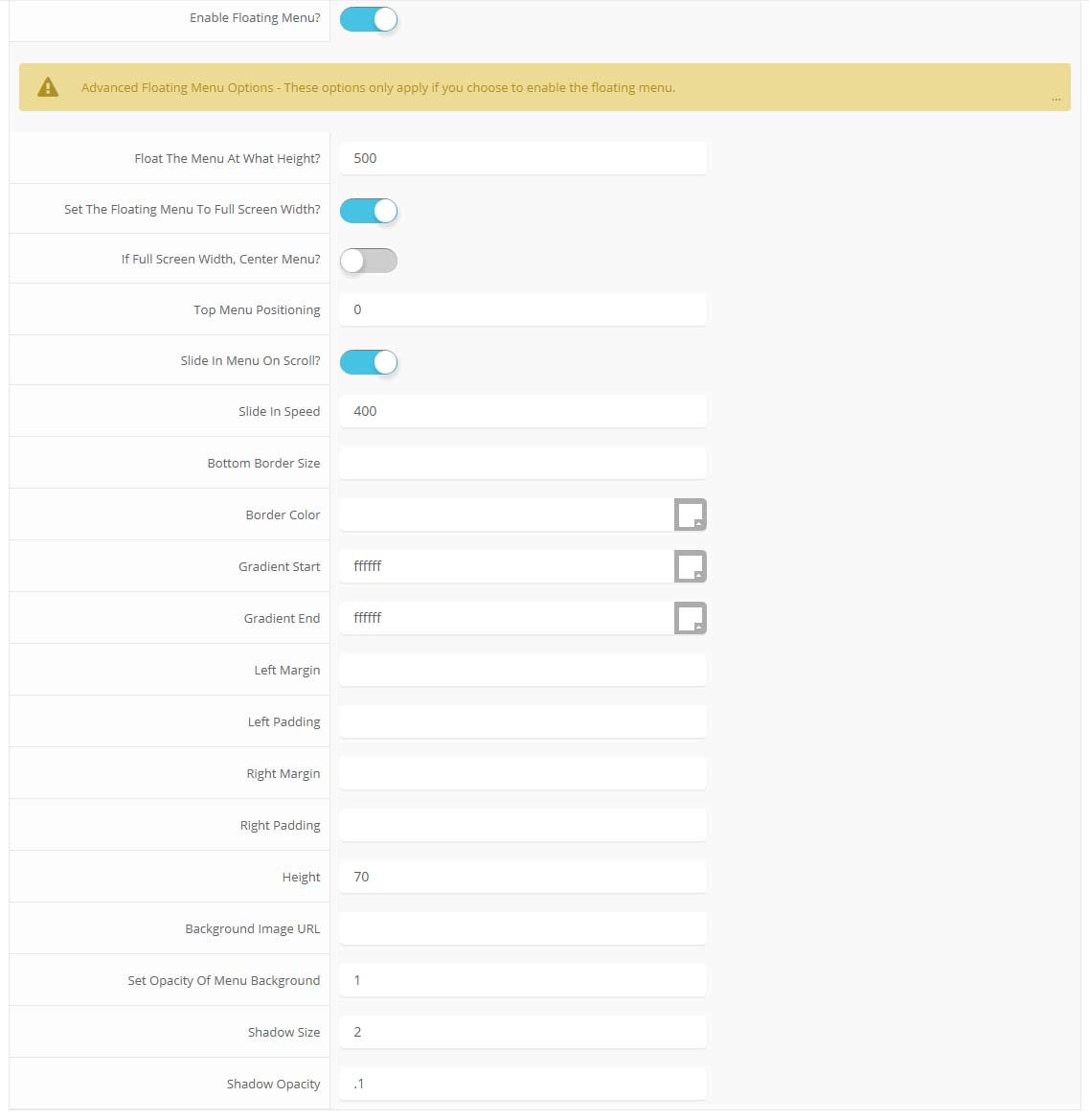
parallax menu admin
Di Seri Bintang, Pembelajaran Melangkaui Sempadan

Kekal Berhubung Bersama Kami

Segala komunikasi dan penyampaian maklumat SK Seri Bintang Utara adalah melalui laman web ini, surat-menyurat dan juga aplikasi Whatsapp sahaja . Pihak sekolah tidak mempunyai sebarang akaun media sosial rasmi seperti Facebook, Instagram dan Twitter. 

Statistik Kunjungan

1243809
Hari IniHari Ini71
SemalamSemalam777
Minggu IniMinggu Ini685
Bulan IniBulan Ini17949